Gears of War: E-Day ↗ / Tools

E-Day Community Toolkit

Free Windows toolkit for creating, packaging and managing E-Day mods. Asset export/rebuild, native ZIP import, per-character appearance and voice selection, presets, backups and experimental rig export.

By SlayerOfThunder · @slayerofthunder0 download requests · Published Oct 16, 2026 · Updated Oct 16, 2026

A CLOSER LOOK

Screenshots & videos

2 moments from the creator

About this mod

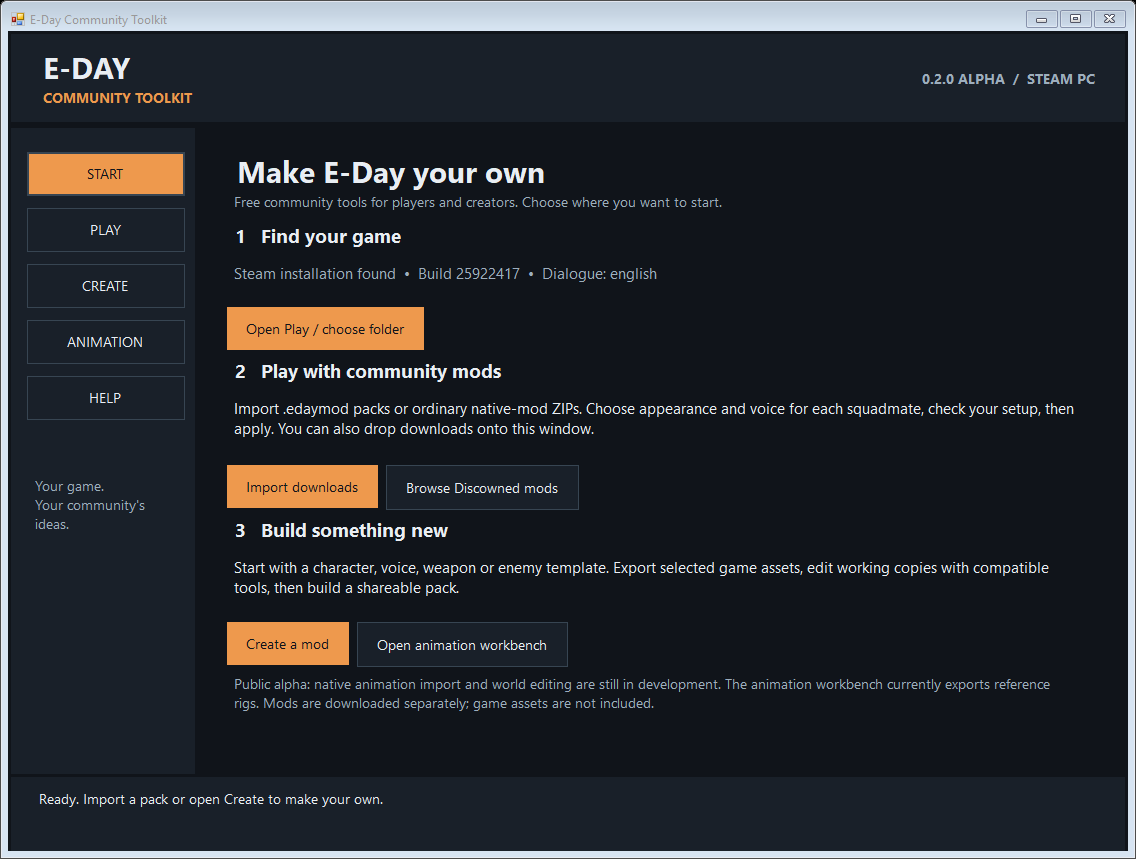
Make E-Day your own. E-Day Community Toolkit is a free, open-source Windows app for players and creators. This public alpha brings the shared parts of our modding workflow into one interface. FOR PLAYERS - Start page with Steam installation detection and guided next steps. - Import .edaymod packs or ordinary native-mod ZIP downloads; multi-select and drag-and-drop supported. - Choose appearance and voice separately for Marcus, Dom, Lucas and Mags, using imported packs with declared character slots. Shared dependencies are added when one compatible version is available. - See game-patch and dialogue-language compatibility before applying. - Save/share presets containing pack IDs, with verified backups, undo, removal and interrupted-install recovery. FOR CREATORS - Starter templates for character appearance, character voice, weapons, enemies and animation research. - Search installed game assets, export selected cooked assets and preserve original and working copies. - Rebuild compatible edited cooked assets into native UE5.6 containers and shareable .edaymod packs. - Package existing native mods with build, language, compatibility and credit metadata. - Experimental reference-rig export to JSON/glTF. ALPHA SCOPE External compatible tools are required for modeling, textures, audio and asset editing. This app does not automatically convert raw Blender/FBX/PNG/WAV files, import new animations into E-Day or edit campaign worlds. Rig export includes joints and bind transforms, not the character surface. Each mod needs its own gameplay testing. No game assets or proprietary compression DLL are included. No account, subscription, telemetry or payment is required to use the toolkit. Source is included as a separate download under MIT. Unofficial community software, not affiliated with Microsoft or The Coalition.

Install & remove

1. Download the Windows x64 ZIP and extract the entire folder somewhere writable. 2. Open E-Day Toolkit.exe. Use Start, then Play to confirm your GoWEDay Steam folder. 3. Import a creator's .edaymod pack or native .pak/.utoc/.ucas ZIP. Ordinary ZIP imports ask you to supply metadata; declare character appearance/voice slots if you want them in Choose squad. Keep each native trio together and select one intended variant. Installer scripts and other non-native ZIP files are not run or installed. 4. Tick packs or use Choose squad. Check selection, close E-Day, then Apply selection. Launch normally through Steam. 5. Use Undo last change to restore your previous toolkit setup, or Restore original to remove toolkit-owned packs. Keep GoWEDay/EdayToolkit-Backups for recovery. Vortex users: purge Vortex deployment before using this tool to manage the same game folder. Existing manual mods remain separate. To remove the app, first remove its installed packs using Restore original, then delete the extracted app folder. START-HERE.txt and CREATOR-GUIDE.txt include full instructions. Mods are downloaded separately.

Requirements

64-bit Windows and .NET Framework 4.8. Player installs and game asset export target the Steam PC edition of Gears of War: E-Day. No Game Pass, console or multiplayer compatibility claim. Players need no Python, Node, Unreal Editor or compiler. Creators need external compatible asset tools. Compressed exports may need oo2core_9_win64.dll from your own licensed installation; select it in Help. It is not included or uploaded by the toolkit. Packs declare exact supported Steam builds and dialogue languages. The converter currently targets the UE5.6 format used by the existing asset workflows.

Credits & permissions

Toolkit code: SlayerOfThunder, MIT licence; full source and licence included. retoc v0.1.5: Truman Kilen and Archengius, MIT; licence and project information included. Upstream: https://github.com/trumank/retoc The empty 347-byte Pak template contains no game assets. Game assets and third-party mods remain subject to their respective owners' terms. No proprietary Oodle library is redistributed.

Licence

MIT. Follow the selected licence and the creator’s permissions above.

Files & versions

A free account is required to download mods.

E-Day-Community-Toolkit-0.2.0-alpha-Source.zip

Optional · v0.2.0-alpha-source · 2.7 MB · game Windows x64 / creator source
PUBLISHED

Complete MIT-licensed source, build script, guides, tests and licensed converter inputs. Rebuilds independently with the Windows .NET Framework compiler. Most users should download the Windows x64 main file. No game assets, proprietary compression library, private settings or test projects included.

Antivirus passed · ClamAV · 10/16/2026, 4:10:41 AM UTC. 26 archive entries. Includes executable code or scripts.

SHA-256 checksumbadc77623b9f661f97b4a0ef1283364ca972f48ea5bcf793a73d99b1e51762ed

E-Day-Community-Toolkit-0.2.0-alpha-Windows-x64.zip

Latest main releaseMain file · v0.2.0-alpha · 2.7 MB · game Steam PC / UE5.6 asset workflow
PUBLISHED

First public feature release. Guided Start, native ZIP/multiple-download import, drag-and-drop, separate squad appearance and voice choices, dependency selection, compatibility labels and creator templates. Includes asset export/rebuild, presets, backup/undo/recovery and experimental rig export. Read START-HERE.txt; extract the complete ZIP and run E-Day Toolkit.exe.

Antivirus passed · ClamAV · 10/16/2026, 4:10:11 AM UTC. 17 archive entries. Includes executable code or scripts.

SHA-256 checksum8d1b296634f48841b7bc60adb1e4c9c74acbd877b4ab40fad8b6cbf1d5f88317

Talk to the creator. Help each other.

Comments

Questions, feedback, fixes you’ve found. This is the place.

Loading comments…
Report abuse or a policy violation

For installation help or bug reports, use Comments. Abuse reports go privately to site operators. Do not attach or describe illegal imagery; use the child-safety reporting instructions.

Sign in to report this mod.